Components Overview
Think of the NPCA EMR Clinical Data Standard as telling the complete story of a patient's journey through a hospital visit. Each component represents a chapter in this story, connected through unique codes that link everything together.
The Patient Journey Story
Every story starts with a person - the Patient who needs medical care. When they arrive at the hospital, a new Visit begins. This visit becomes the container for everything that happens during their stay.
The journey unfolds through encounters:
- Triage - The first stop where nurses assess how urgent the patient's condition is
- Outpatient/Inpatient/Emergency - The main treatment areas where doctors provide care
- Progress Notes - Daily check-ins during longer stays (for inpatients)
- Surgery - Special procedures when needed
Throughout the journey, we collect information:
- Vital Signs - Temperature, blood pressure, heart rate
- Medical History - What happened before this visit
- Physical Examinations - What doctors observe and feel
- Laboratories & Imageries - Test results and scans
- Diagnoses - What's wrong with the patient
- Prescriptions - Medications to help them get better
- Invoices - What services were provided and their costs
Component Relationships & Unique Codes
Each component has a unique code that identifies it. Other components reference these codes to show relationships:
- Patient:
codeidentifies them in their own object, while other components link to it viapatient_code - Visit:
codeidentifies them in their own object, while other components link to it viavisit_code - Encounters: There are 6 components that are encounters in their nature:
triages,outpatients,inpatients,emergencies,progress_notes, andsurgeries. If you seeencounter_codein a component, it links to one of these.
Strict Linking Rules for Encounters
Main Encounter Types
- Outpatient, Inpatient, Emergency are top-level encounters
- Triage is a special encounter that must be included in every visit
- Progress Note is a sub-encounter that must link to an Inpatient (
progress_notes.encounter_code=inpatient.code) - Surgery is another sub-encounter that can link to either Outpatient or Inpatient (
surgeries.encounter_code=inpatient.codeORsurgeries.encounter_code=outpatient.code)
Clinical Data Linking Rules
Vital Signs:
- Must have at least 1 link to Triage (
vital_signs.encounter_code=triage.code) - Additional vital signs link to Progress Notes (
vital_signs.encounter_code=progress_notes.code)
Physical Examinations:
- Must link with a main encounter like Outpatient, Inpatient, or Emergency
- Cannot link directly to sub-encounters like Progress Notes or Surgery
Medical Histories:
- Must link with a main encounter (same as Physical Examinations)
- Provides context for the main treatment episode
Laboratories and Imageries:
- Can link with main encounters (Outpatient, Inpatient, Emergency)
- Can also link with Progress Notes to provide clearer timeline
- This flexibility allows tracking when tests were ordered vs. when results came back
Diagnoses:
- Must link with main encounters or sub-encounters
- Provide clinical conclusions at different stages of care
- Can help track diagnostic evolution throughout the visit
Prescriptions - Medication Location Rules:
- Home medications: Link to Visit via
visit_codebut NOT to encounter (encounter_code: null) - Hospital medications: Link to Visit via
visit_codeAND to encounter (prescription.encounter_code= one of the encounter codes) - Can link to main encounters OR Progress Notes for clearer picture of when medications were given
Invoices:
- Do not need the same separation as Prescriptions
- If linked to an encounter or sub-encounter, they provide clearer picture of when charges occurred
- Can help track billing by specific treatment episode
Referral Rules
Referrals are special components that happen in specific scenarios:
Patient Referred IN:
- Visit will have
admission_typeas "Refer" referrals.referred_fromcontains information about the sending facility
Patient Referred OUT:
- Visit will have
discharge_typeas "Refer Out" referrals.referred_tocontains information about the receiving facility
Health Facility Data:
- Standard data lookup endpoint provides all health facility information
- Use this data to populate referral forms correctly
Data Validation Summary
Required Relationships
- Every visit MUST have exactly one Triage
- Every visit MUST have at least one main encounter (OPD/IPD/Emergency)
- Progress Notes can ONLY exist with Inpatient encounters
- All clinical data MUST link to appropriate encounter types
- Referral data MUST match visit admission/discharge types
Code Uniqueness Rules
- Patient codes: Unique system-wide
- Visit codes: Unique per healthcare facility
- Encounter codes: Unique within the EMR system
- All other codes: Unique within their respective component type
Data Integrity Rules
- Use
nullfor empty values, never remove fields entirely - Referral data is required when patients are transferred between facilities
- All datetime fields must use Cambodia timezone (+07:00)
- All codes must be pre-existing and valid within the system
Visit Flow Examples
Let's put what has been described so far into visual examples:
Outpatient Visit Flow
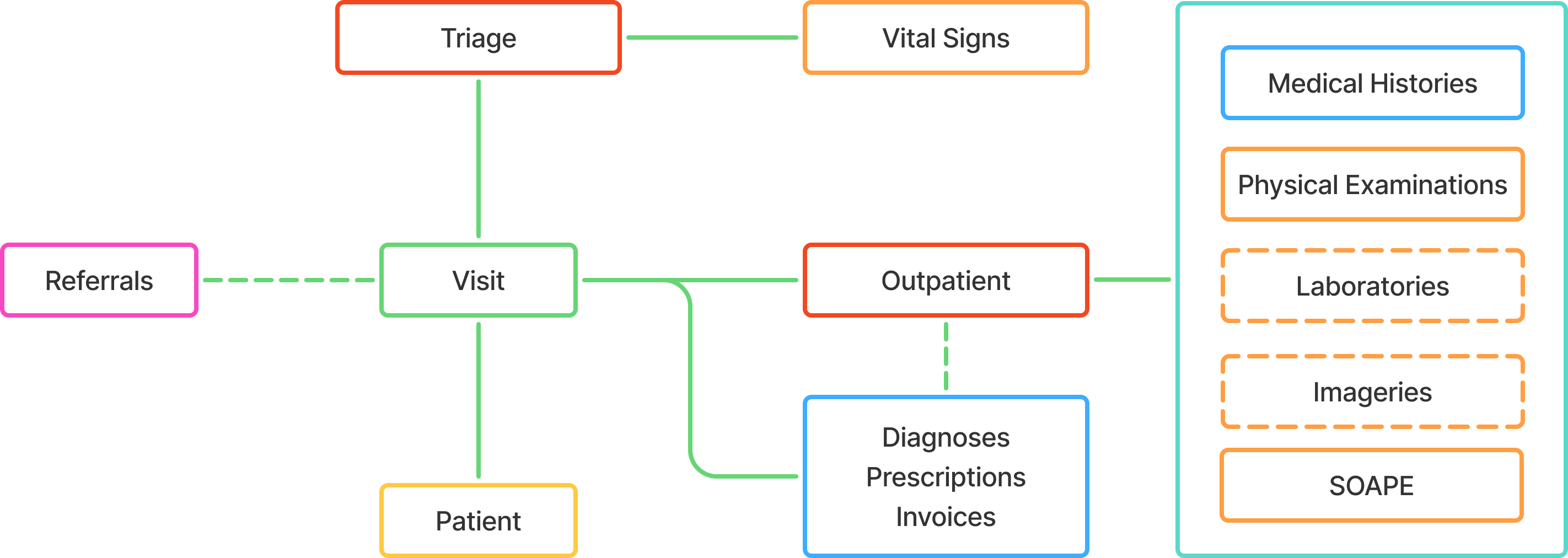
Typical Outpatient Journey:
- Patient arrives → Triage assessment
- Triage → Basic vital signs, chief complaint recorded
- Outpatient encounter → Doctor consultation, examination
- Clinical data collection → Labs ordered, physical exam, medical history
- Diagnosis & treatment → Doctor determines condition, prescribes medication
- Discharge → Patient leaves with home medications and follow-up instructions
Inpatient Visit Flow
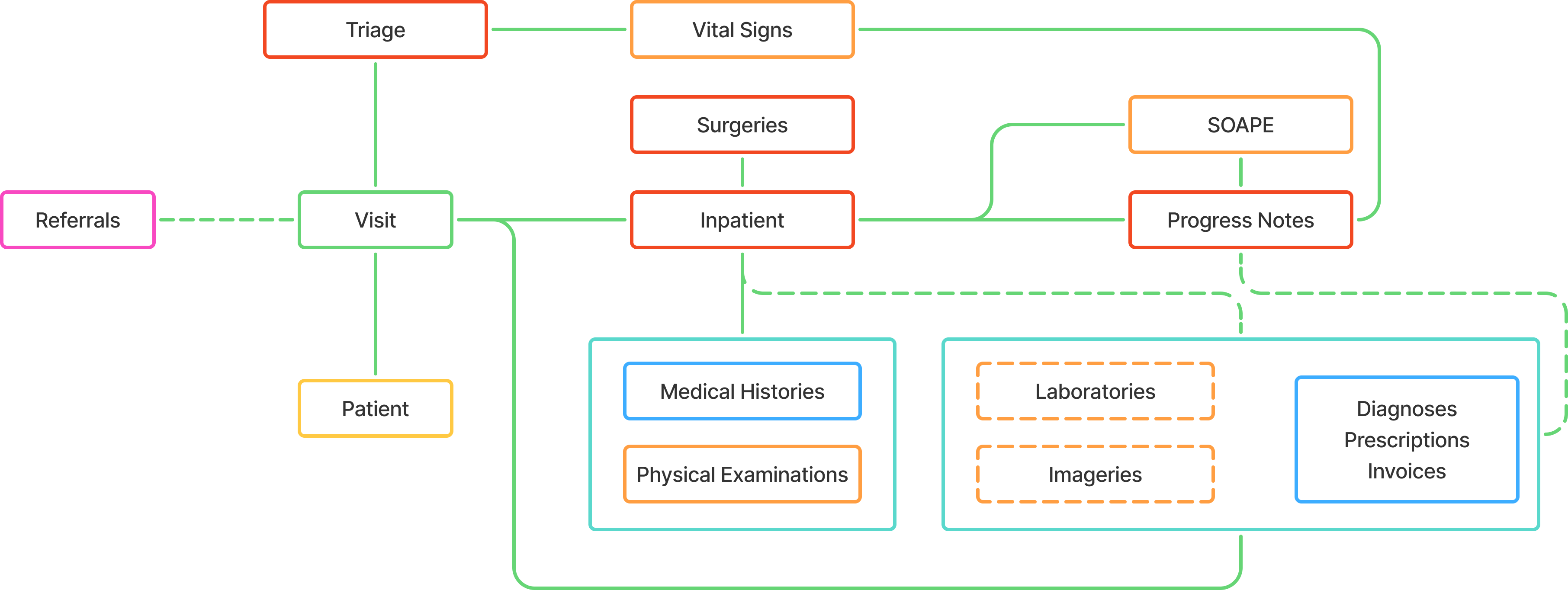
Typical Inpatient Journey:
- Patient arrives → Triage assessment
- Triage → Urgent condition identified, needs admission
- Inpatient encounter → Admission to ward, initial treatment
- Daily progress notes → Regular monitoring, vital signs, medication adjustments
- Additional services → Labs, imaging, possible surgery
- Recovery & discharge → Condition improves, discharge planning
Emergency Visit Flow
Emergency to Outpatient
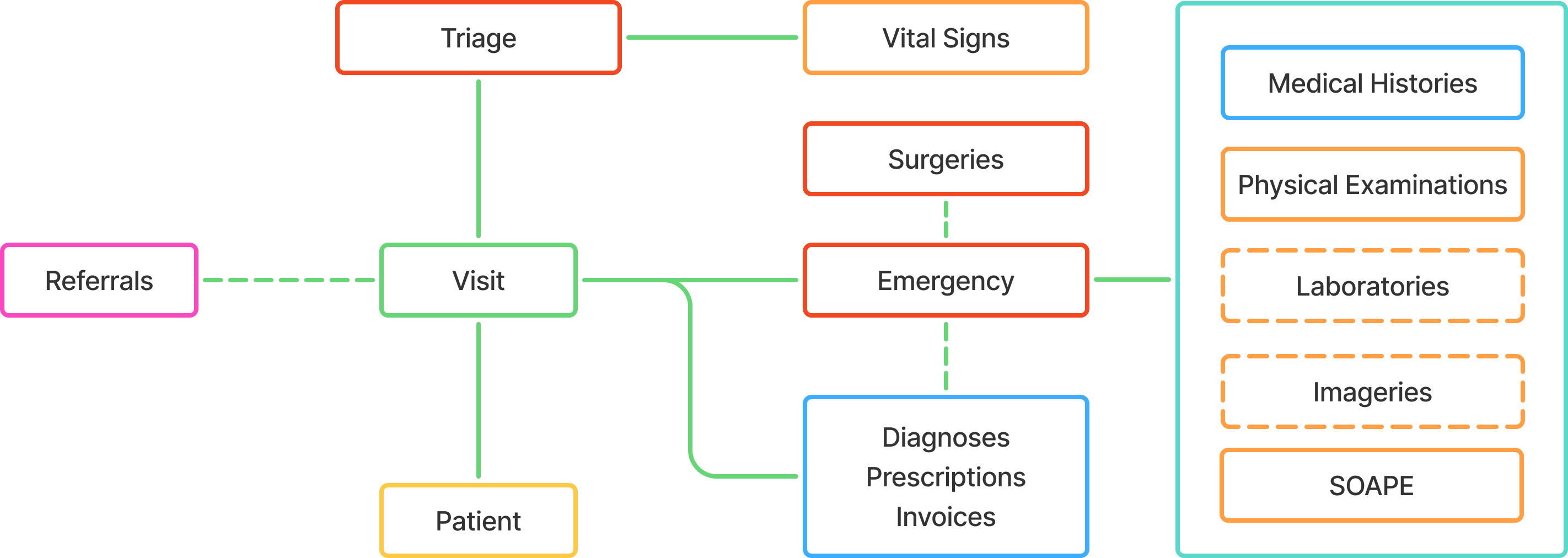
Emergency to Outpatient Journey:
- Patient arrives → Immediate triage for urgency assessment
- Emergency encounter → Rapid assessment and stabilization
- Treatment & monitoring → Immediate interventions, vital signs monitoring
- Condition stabilized → Patient responds well to treatment
- Discharge home → Patient leaves with medications and follow-up instructions
Emergency to Inpatient
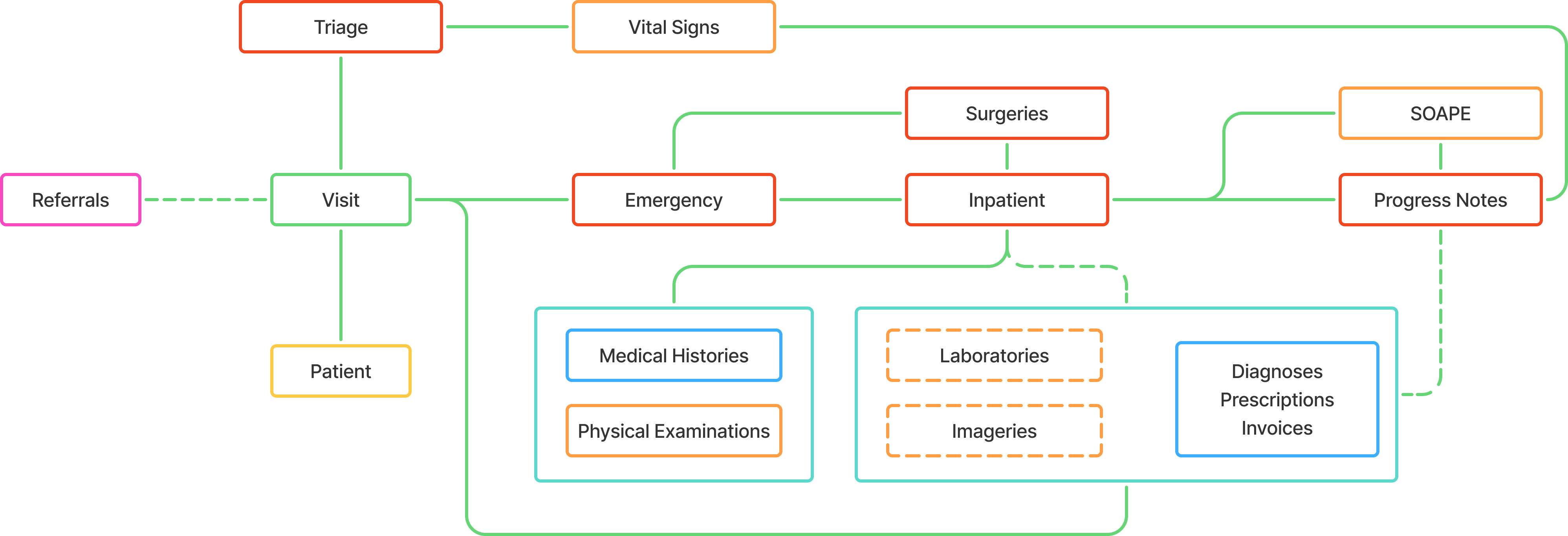
Emergency to Inpatient Journey:
- Patient arrives → Immediate triage for urgency assessment
- Emergency encounter → Rapid assessment and stabilization
- Critical condition identified → Patient needs ongoing hospital care
- Admission to ward → Transfer to inpatient unit for continued treatment
- Daily progress notes → Regular monitoring, medication adjustments
- Recovery & discharge → Condition improves, discharge planning
Component Categories
Our components are organized into logical categories for easier understanding and implementation:
Base Components
- Encounter - Clinical interactions between patient and providers
- Observations - Flexible data collection system for any patient information
- Conditions - Medical conditions and diagnoses tracking system
- Services - Healthcare services and procedures provided to patients
Core Components
- Patient - Personal information and demographics
- Visit - Hospital stay container
- Triage - Initial patient assessment
- Vital Signs - Body function measurements
- Medical History - Past health information
- Physical Examination - Clinical findings
- Laboratories - Test results and analysis
- Imageries - Radiology and imaging results
- Diagnosis - Medical conclusions
- Prescriptions - Medication orders
- Invoices - Financial records
- Referrals - Inter-facility transfers
Specific Encounters
- Inpatient - Hospital admission encounters
- Outpatient - Clinic visit encounters
- Emergency - Urgent care encounters
- Surgery - Surgical procedure encounters
- Progress Notes - Daily monitoring encounters
Quick Reference
Component Hierarchy
Patient
└── Visit
    ├── Triage (required)
    ├── Main Encounters (at least one required)
    │   ├── Outpatient
    │   ├── Inpatient
    │   └── Emergency
    ├── Sub-Encounters (optional)
    │   ├── Progress Notes (IPD only)
    │   └── Surgery (OPD/IPD)
    └── Clinical Data
        ├── Vital Signs
        ├── Medical History
        ├── Physical Examination
        ├── Laboratories
        ├── Imageries
        ├── Diagnosis
        ├── Prescriptions
        ├── Invoices
        ├── Referrals
        ├── Conditions
        └── Services
    └── Base Components
        ├── Observations
        ├── Conditions
        └── Services
Key Linking Patterns
- Patient ←
patient_code← All other components - Visit ←
visit_code← All encounter and clinical components - Encounters ←
encounter_code← Clinical data components - Observations ←
observation_code← Related observations (optional)
Next Steps
- Review Base Components for fundamental structures
- Explore Core Components for main data models
- Check Specific Encounters for encounter types
- Refer to References for standard codes and values
Important
Each component tells part of the patient's healthcare story. When connected together through their unique codes, they create a complete picture of the patient's journey from arrival to discharge, including all the care, tests, treatments, and outcomes along the way.